003/ ServicesAI training
AI training for Chicago teams
In short312 IT Consulting runs hands-on AI training for employees of Chicago small and mid-size businesses: role-specific workshops on tools like ChatGPT, Microsoft Copilot and Claude, an AI acceptable-use policy, shared prompt standards, and custom copilots, agents or voice agents for real workflows.
Last updated: September 2026 · First call free · Reply within one business day
What our AI training includes
Our AI training has four parts: hands-on workshops for each role, a written AI acceptable-use policy, a shared prompt library, and — where it clearly pays off — custom copilots, agents or voice agents built for a real workflow.
001/ Scope4 parts · 1 rollout
- Role-specific workshopshands-on, on your real tasks
- AI acceptable-use policyapproved tools, data rules, review
- Prompt standardsa shared, tested prompt library
- Copilots & agentsfor workflows worth automating
- Voice agentslike Sofia, our AI receptionist
- Follow-up sessiona few weeks after the workshops
The goal isn’t for your team to “learn AI.” It’s for the sales rep to prep a call in five minutes instead of thirty, for the operations lead to turn a messy voice memo into a clean checklist, and for everyone to know — without asking — what they may and may not paste into a chatbot. Skills and rules arrive together, so adoption doesn’t outrun judgment.
Role-specific workshops (sales, operations, finance, leadership)
Each workshop is a 2–3 hour hands-on session for one role group, built around that group’s actual work — their emails, reports, spreadsheets and meetings — not generic demos. Everyone leaves with prompts they’ll use the next day.
| Role | What they practice |
|---|---|
| Sales | Prospect and account research, first drafts of emails and proposals, call prep, turning call notes into CRM updates |
| Operations | Writing SOPs, turning messy notes into checklists, spreadsheet formulas and cleanup, summarizing long threads |
| Finance | Explaining variances in plain English, summarizing contracts, formula help — with clear rules on which numbers stay out |
| Customer service | Reply drafts in your tone, building a knowledge base, handling difficult messages calmly |
| Leadership | Strategy memos and board updates, spotting where AI fits the business, making the policy decisions only owners can make |
Before a workshop we collect a handful of real tasks from the group (anonymized where needed). In the room, people work on those tasks on their own laptops, with their own accounts, and we show them how to check the output — because the most important AI skill is knowing when the answer is wrong. For a head start, read how to get started with AI in your business.
AI acceptable-use policy and governance
An AI acceptable-use policy tells employees which AI tools are approved, what data must never be pasted in, and when a human has to review the output. We draft one for your business as part of the training, so the rules and the skills arrive together.
- Approved toolsand which accounts to use them with
- Data that never goes incustomer personal data, passwords, confidential client files
- Human reviewwhat must be checked before it’s sent
- Disclosurewhen to tell a customer AI was involved
- Business accounts onlyno personal chatbot logins for work
- Owner & review datewho updates it, and when
The policy is written in plain English, fits on a few pages, and matches the tools you actually use. Want to see the shape of one first? Start with our free AI acceptable use policy template. If AI governance is part of a wider plan — security, vendors, budget — it fits naturally into an IT strategy engagement.
Prompt standards your whole team shares
Prompt standards are a shared library of tested prompts plus one simple structure for writing new ones, so good results don’t depend on who happens to be “good at AI.”
ROLE     You are a sales assistant for [our company].
CONTEXT  Account notes and the last 3 emails are below.
TASK     Summarize where this deal stands and list 3 questions to ask.
FORMAT   5 bullets, then the 3 questions. Plain English.
RULES    Use only the notes below. Say "unknown" if unsure.
Every entry in the library has an owner, a “good output looks like” example, and notes on what to check. It lives wherever your team already works — a shared doc, your intranet, or the saved-prompt feature of the tool you use — and it grows as people find prompts worth sharing. Ready to go further? Our guide to building your first AI workflow shows the next step.
Copilots, agents and voice agents for real workflows (Sofia case study)
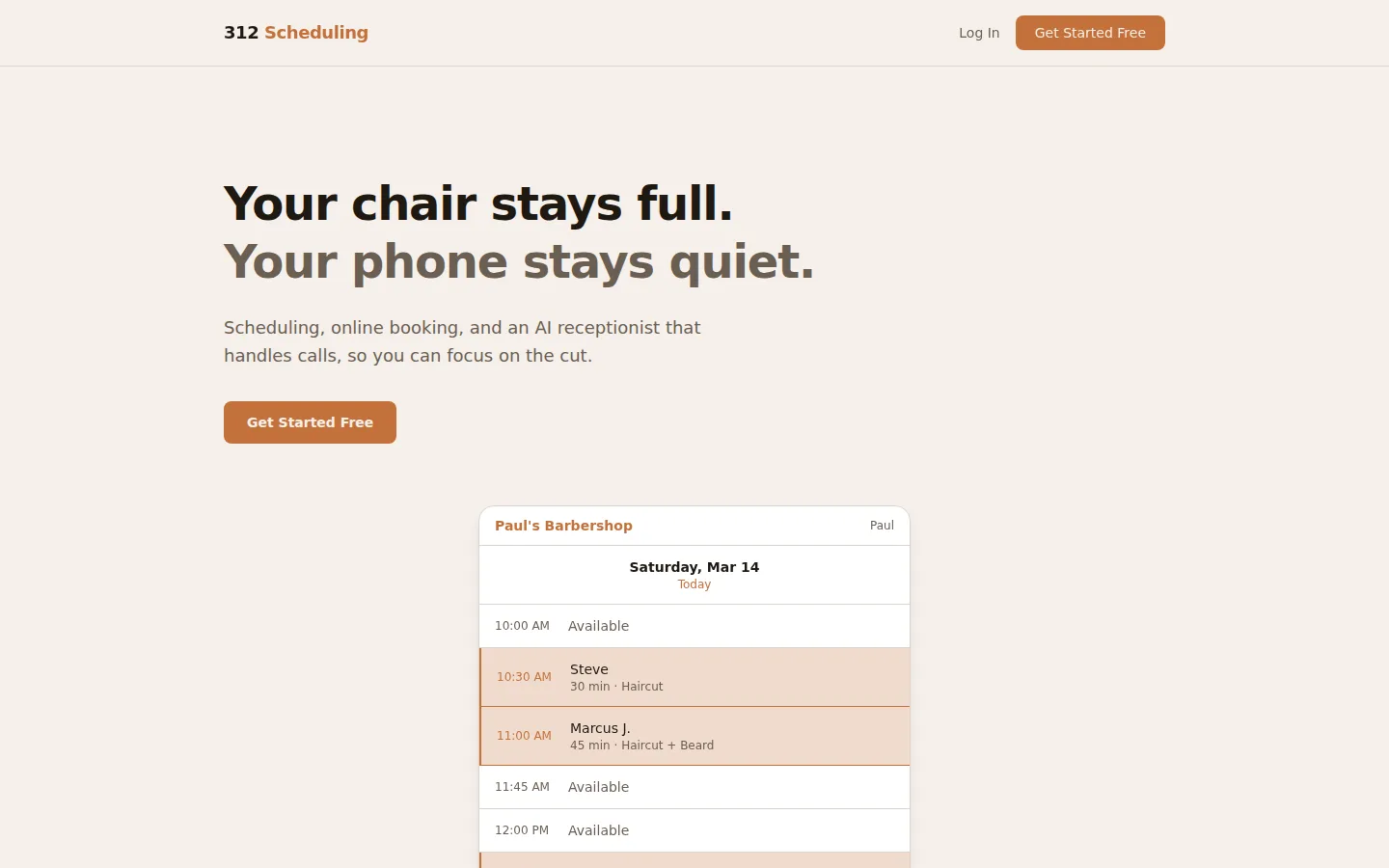
When training uncovers a task AI can reliably take over, we build it: custom copilots, workflow agents and voice agents. Our own proof is Sofia, the AI voice receptionist in 312 Scheduling, which answers calls 24/7 in English and Spanish and books and cancels appointments.
Case study: Sofia
- The problemMissed calls
- Answers24/7
- LanguagesEN + ES
- Price in 312 Scheduling$0.25/min
Barbers can’t pick up the phone mid-cut, so calls go unanswered and chairs stay empty. Sofia answers every call, books and cancels appointments against the shop’s real schedule, and switches between English and Spanish mid-call when the caller does. It’s a small, well-defined job with clear rules — exactly the kind of workflow an agent does well.
AI speaking practice in Bosanski
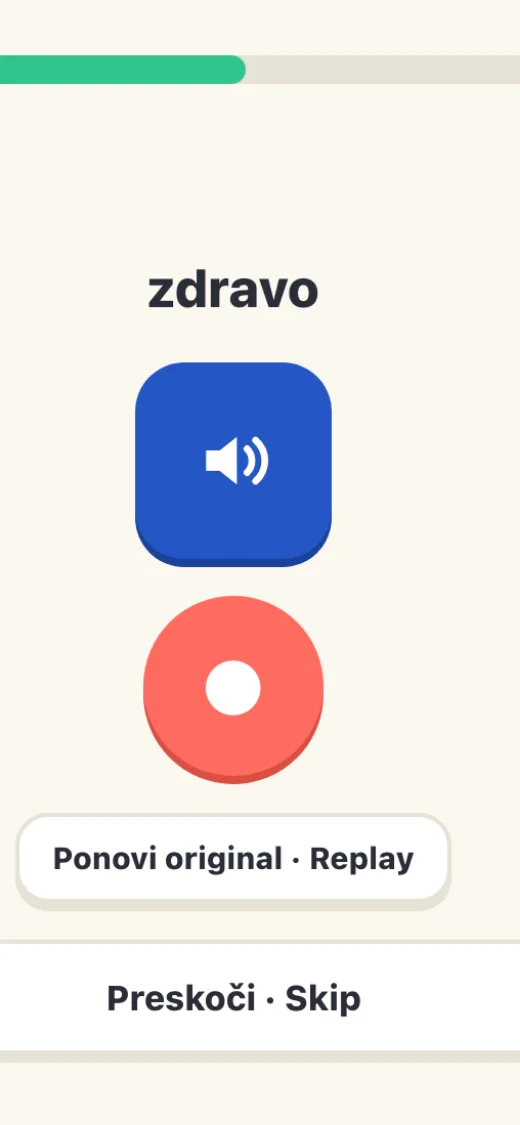
In Bosanski, our Bosnian-learning app, learners talk out loud: Whisper speech recognition listens, and Razgovor, an AI speaking conversation, answers back. It’s scored on being understood, not on being perfect.
Behind the scenes, AI drafts new lessons — but nothing publishes until a teacher approves it. That’s the same “human reviews the output” rule we write into every client’s AI policy, applied to our own product.
Other agents we build: an inbox triage copilot that drafts replies for a human to approve, a document assistant that answers questions from your own policies, and small automations that move data between tools. See real examples in AI agents for small business.
How long does AI training take?
A workshop is a 2–3 hour hands-on session per role group, and a full team rollout — workshops, policy and prompt library — typically takes 1–4 weeks. Timelines are estimates and subject to change based on scope.
Discovery
Which tools you have, which roles need what, and which data is sensitive. We collect real tasks for the workshops.
Policy
We draft your AI acceptable-use policy with leadership, so the rules are ready before the training starts.
Workshops
2–3 hours per role group, on-site or live online, hands-on with your own tools and tasks.
Prompt library
The best prompts from the workshops become your shared library, with a follow-up session a few weeks later.
How much does AI training cost?
A single on-site workshop for up to about 15 people typically starts from about $2,500. A full rollout is quoted in writing based on team size, number of sessions, and whether you need a policy, a prompt library or a custom agent.
| Engagement | Typical timeline | Typical price |
|---|---|---|
| Single workshop (up to ~15 people) | 2–3 hours | From about $2,500 |
| Team rollout (workshops, policy, prompt library) | 1–4 weeks | Quoted in writing |
| Custom copilot, agent or voice agent | Scoped per workflow | Quoted in writing |
Typical prices, not quotes. Every engagement gets a written scope and quote before work starts. Timelines are estimates and subject to change based on scope.
Which AI tools we train on (ChatGPT, Copilot, Claude, Gemini)
We train on the tools your team already has or should have — most often ChatGPT, Microsoft 365 Copilot, Claude and Google Gemini. The core skills of prompting, checking output and protecting data carry across all of them.
| Tool | Where it fits best |
|---|---|
| ChatGPT | General drafting, research and analysis; business plans add admin controls for teams |
| Microsoft 365 Copilot | Inside Outlook, Word, Excel and Teams, working with your Microsoft 365 files and email |
| Claude | Long documents, careful writing and structured analysis |
| Google Gemini | Inside Gmail, Docs and Sheets for Google Workspace teams |
If you’re choosing between them, we’ll help you pick based on what you already pay for and where your files live — a Microsoft 365 business usually gets more from Copilot, a Google Workspace one from Gemini. Our Microsoft Copilot guide covers the Microsoft side in detail.
Who it’s for
AI training is for small and mid-size businesses whose staff already use AI unofficially, or want to, and whose owners want it used safely and well.
- People using AI on personal accountsbring it into the open, safely
- Leaders who need a policybefore something goes wrong
- Teams with repetitive writingproposals, reports, replies
- Businesses with missed callsa voice agent like Sofia
- The Loop
- Evanston
- Wilmette
- Winnetka
- Glenview
- Northbrook
- Lincolnwood
- Niles
- Morton Grove
- Park Ridge
- Chicago
Chicago,
IL
On-site AI workshops across Chicago and the North Shore
We run AI workshops on-site across Chicago — including the Loop — and the North Shore: Evanston, Wilmette, Winnetka, Glenview, Northbrook, Lincolnwood, Niles, Morton Grove and Park Ridge. Remote and hybrid teams join live online.
In-person works best for the first workshop: people try things on their own laptops, ask the questions they wouldn’t type into a chat, and help each other. Follow-up sessions and prompt-library reviews run just as well online.
What does AI training for a team include?
Hands-on workshops built around each role's actual work, plus an AI acceptable-use policy and shared prompt standards. If it helps, we also build copilots, agents or voice agents for real workflows — like Sofia, the AI receptionist in our own 312 Scheduling product.
How long does an AI workshop take?
A typical workshop is a 2–3 hour hands-on session per role group, and a full team rollout — workshops, policy and prompt library — usually takes 1–4 weeks. Everyone leaves with prompts they'll use on their own work the next day. Timelines are estimates and subject to change based on scope.
How much does AI training cost?
We quote each engagement in writing based on team size and number of sessions; a single on-site workshop for up to 15 people typically starts from about $2,500.
Which AI tools do you train on?
We train on the tools your team already has or should have, most often ChatGPT, Microsoft 365 Copilot, Claude and Google Gemini. The skills — writing good prompts, checking output, protecting data — carry across all of them.
Do we need an AI acceptable-use policy?
Yes. A written policy tells employees which AI tools are approved, what data must never be pasted in, and when a human has to review the output. We draft one for your business as part of training, and there's a free template on our blog.
Can you build an AI agent or voice receptionist for us?
Yes. We build copilots, workflow agents and voice agents; our own Sofia answers calls 24/7 in English and Spanish, and books and cancels appointments for barbershops and salons.
Do you train on-site in Chicago?
Yes. We run workshops on-site across Chicago and the North Shore, or live online for remote and hybrid teams.
Book an AI workshop.
The first call is free, and we reply within one business day. Tell us your team size and tools — we’ll suggest where to start.
Book an AI workshop (224) 382-4084